portfolio terminal
Security notes
What a Kerberos ticket actually represents
A closer look at Kerberos tickets, session keys and authenticators, illustrated with an RDP capture in Wireshark.
When learning about Kerberos, it is easy to focus on the basic sequence: request a TGT, request a service ticket, and present that ticket to a service. Once you understand those steps, you can follow the authentication flow.
In my previous article, I explained that flow. This time, I want to look more closely at what a Kerberos ticket actually represents. I will use a PCAP of an RDP capture using Kerberos authentication from https://github.com/awakecoding in this blog.
The word ticket might suggest something like a concert ticket: you show it at the entrance and receive access. With Kerberos, there is more happening. The ticket carries protected information about an identity, using it requires additional proof, and the destination still decides what that identity is allowed to do.
A cryptographically protected statement
In a Windows Active Directory environment, the Key Distribution Center (KDC) runs on a domain controller. It issues tickets that clients can present during authentication.
A useful way to think about a service ticket is as a cryptographically protected statement connecting a client identity, a destination service, and a session key.
Suppose I, Jamal, want to connect to a server through Remote Desktop using Kerberos. My workstation obtains a service ticket from the KDC. Its protected contents are encrypted with a key associated with the destination service’s account.
My workstation carries the ticket to the destination, but normally cannot decrypt those contents or alter them without invalidating their cryptographic protection. The destination service has the key needed to process them.
Kerberos ticket validation does not require the service to receive my password. However, an RDP connection using CredSSP can also delegate credentials to the destination. The Kerberos exchange is one part of that broader connection process. Microsoft: CredSSP
What is inside a ticket?
A ticket contains visible information identifying its destination, together with an encrypted portion carrying the protected information.
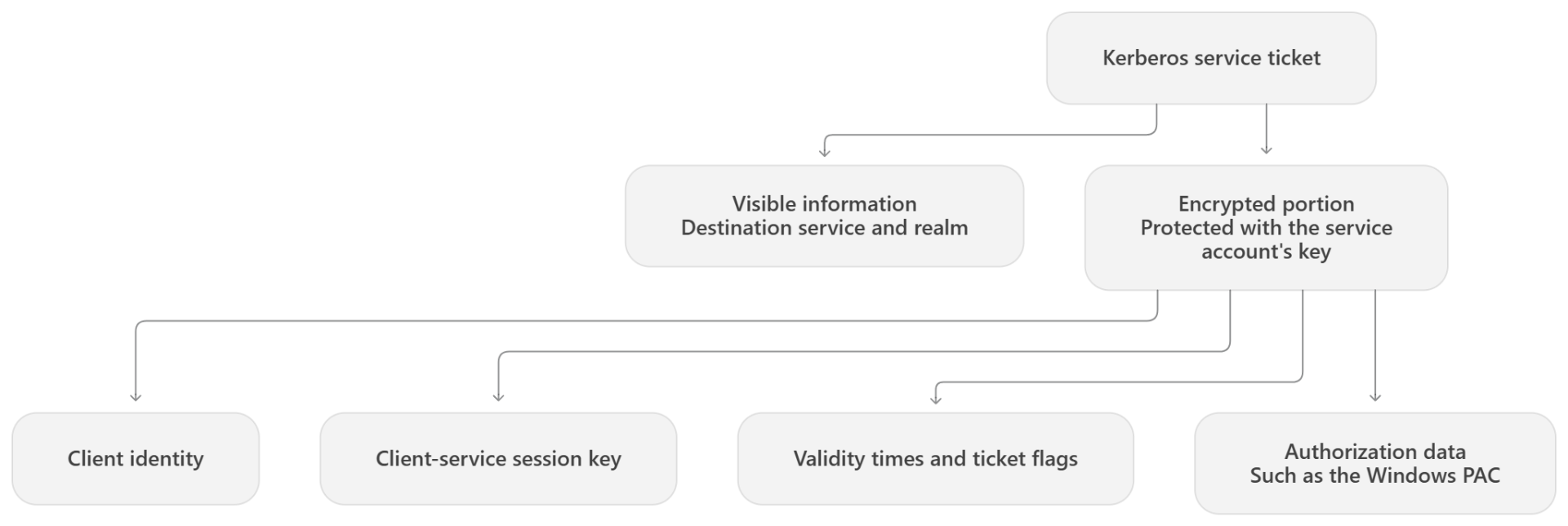
| Part | Examples |
|---|---|
| Visible ticket fields | Ticket version, service realm and service name |
| Encryption metadata | Encryption type and, where present, key version |
| Encrypted contents | Client identity, session key, validity times, ticket flags and optional authorization data |
These fields give the ticket a specific context: an identity, an intended service, a validity period, and properties governing its use. Flags can indicate, for example, whether the ticket is renewable or forwardable.
In Active Directory, authorization data commonly includes a Privilege Attribute Certificate (PAC). This carries information such as security identifiers and group memberships that Windows can use when making access decisions. In our packet capture, we cannot see the contents of the PAC, because the ticket is not decrypted. However, we can see the requests:
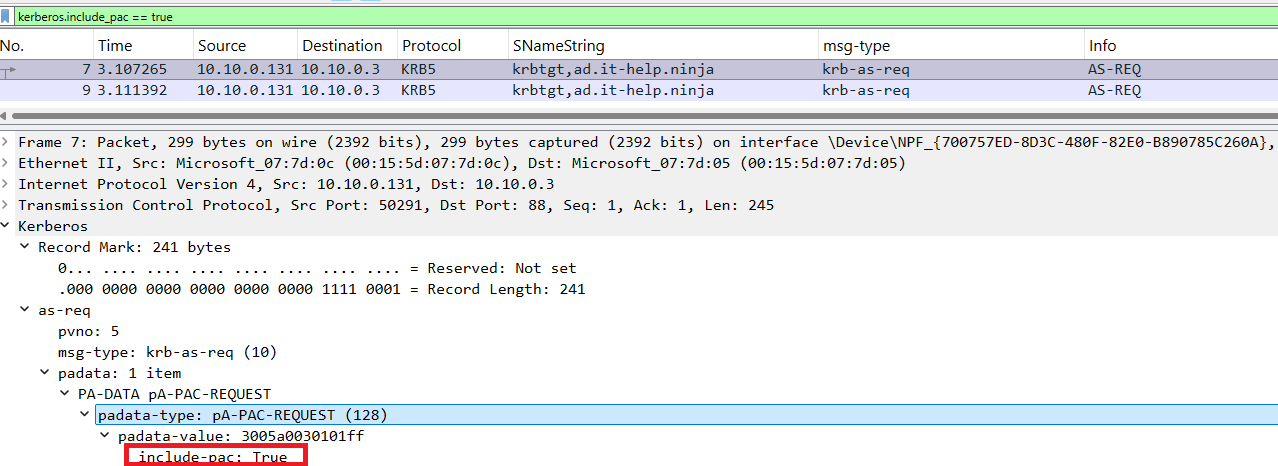
What Wireshark shows
Opening the PCAP from the source at the top, we can see the destination is IT-HELP-TEST.ad.it-help.ninja.
The capture uses the Administrator account; Jamal is the illustrative user in this article.
In packet 12, the KDC returns a TGS-REP containing a service ticket for: TERMSRV/IT-HELP-TEST.ad.it-help.ninja
The TERMSRV prefix identifies the Remote Desktop service.
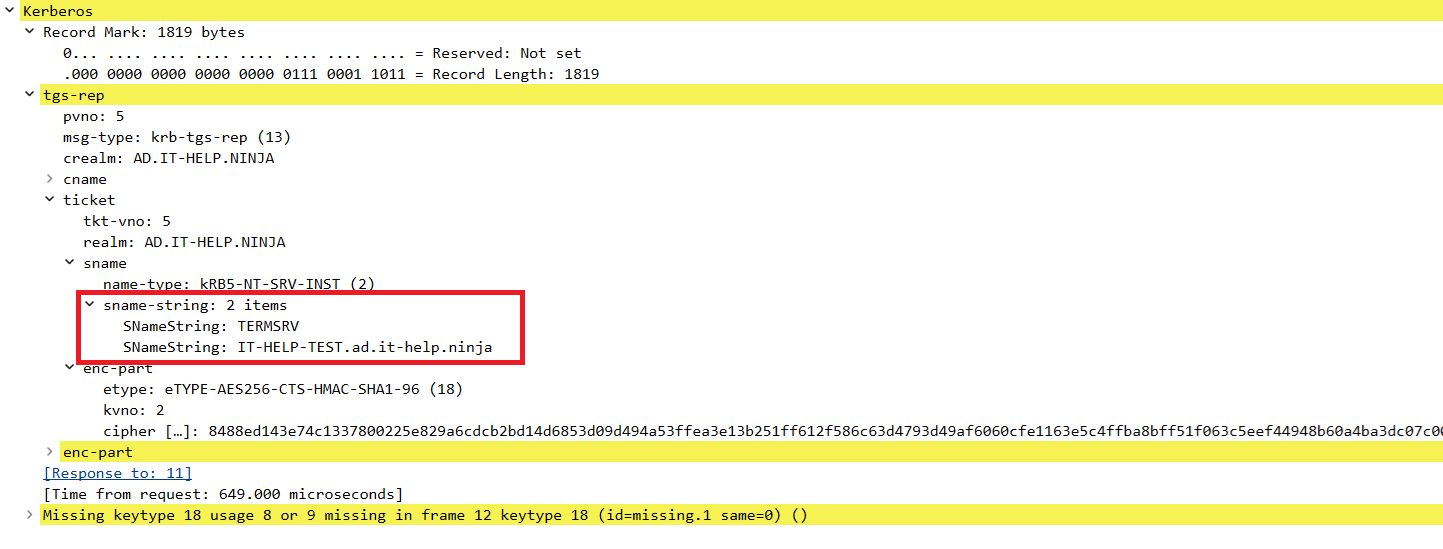
Expanding ticket → sname reveals the service name. Expanding the ticket’s enc-part shows encryption metadata and ciphertext. It does not automatically reveal the client identity, session key or validity times inside that encrypted content.
There are also two different enc-part structures in this response: one inside the ticket and another belonging to the TGS-REP itself. The latter carries information protected for the requesting client, including its copy of the service session key.
Why the ticket alone is not enough
Alongside the service ticket, the client receives its own protected copy of the session key. The destination service obtains the corresponding key by decrypting the ticket.
When authenticating, the client uses that session key to encrypt an authenticator, containing information such as the client identity and a timestamp. The service checks the authenticator against the ticket and applies freshness and replay checks.
The ticket carries the KDC-issued identity information. The authenticator demonstrates possession of the session key associated with that ticket.
This is why capturing a ticket from network traffic does not automatically allow someone to authenticate with it. Creating a fresh, valid authenticator also requires the associated session key. Stealing usable credentials from a compromised endpoint is a different situation.
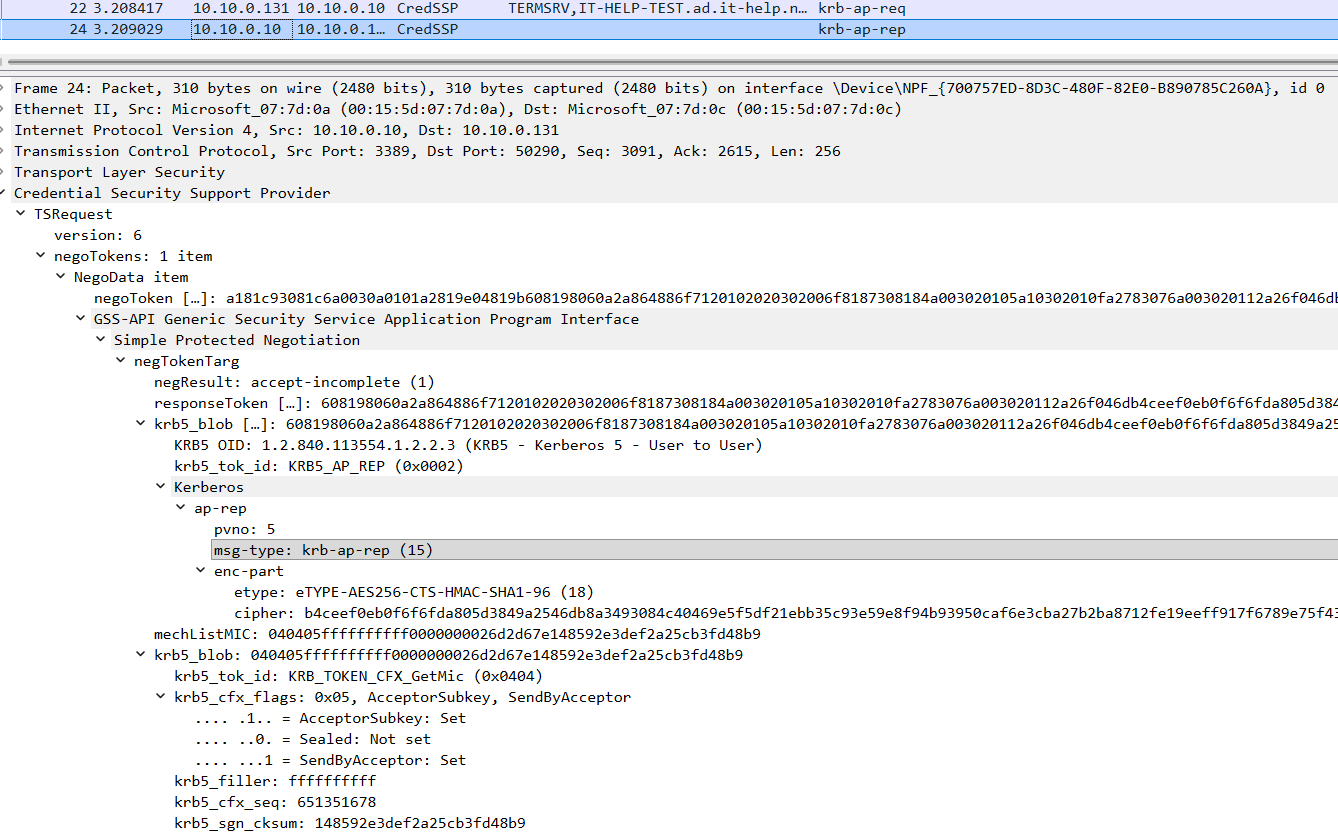
In this capture, packet 22 contains the AP-REQ, which presents the service ticket and authenticator to the RDP server.
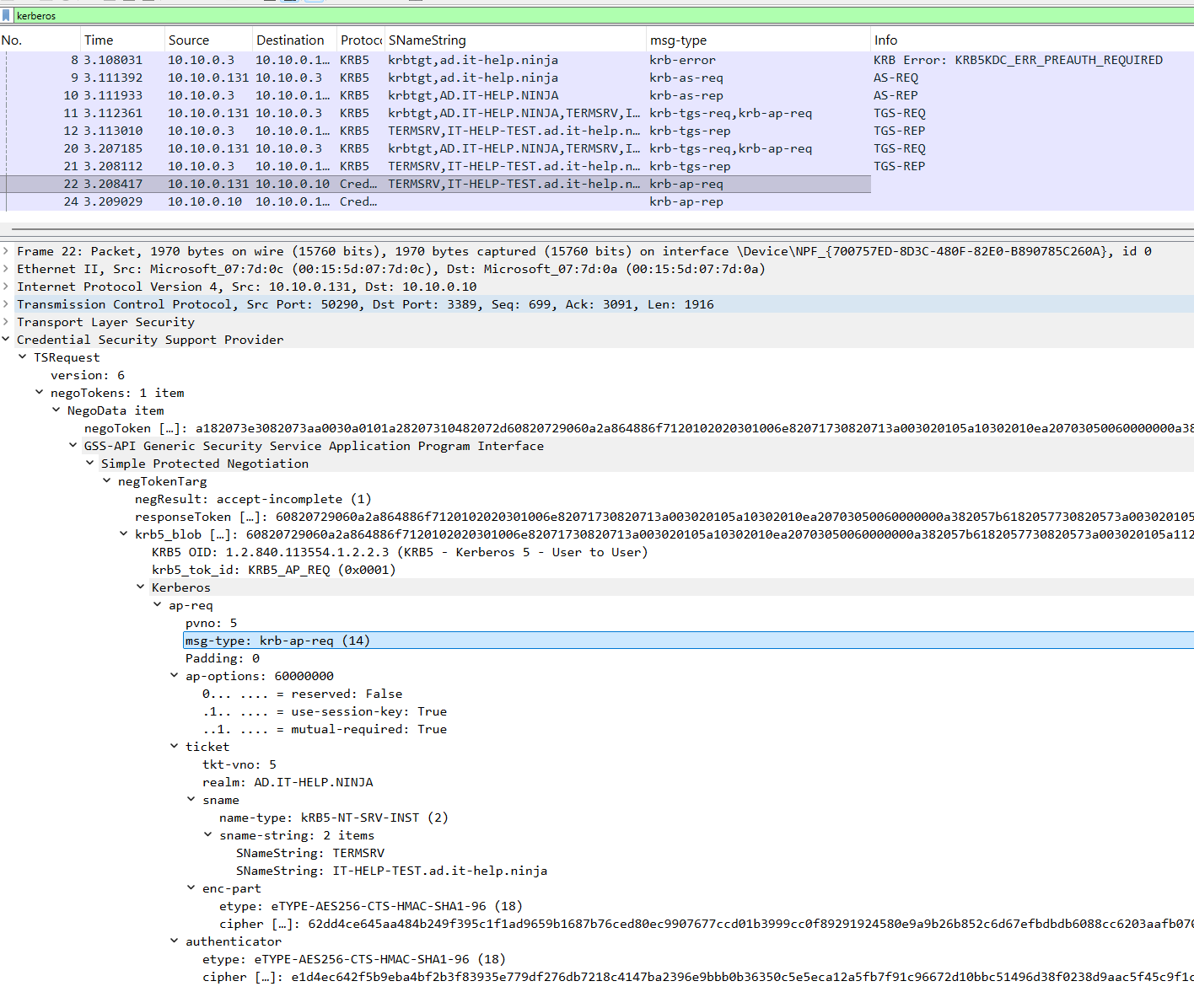
Packet 24 contains the AP-REP, the server’s response for mutual authentication.
Why a TGT is different from a service ticket
A Ticket Granting Ticket (TGT) is itself a ticket for a particular service: the KDC’s ticket-granting service.
The client presents its TGT, together with an authenticator, when requesting tickets for other services. This allows subsequent ticket requests to use the TGT’s session key without repeating the initial password-based authentication exchange.
| Ticket | Presented to | Purpose |
|---|---|---|
| TGT | The KDC’s ticket-granting service | Authenticate a request for another ticket |
| Service ticket | The intended application or service | Authenticate the client to that service |
The distinction becomes clearer when we look at the captured exchanges in Wireshark:
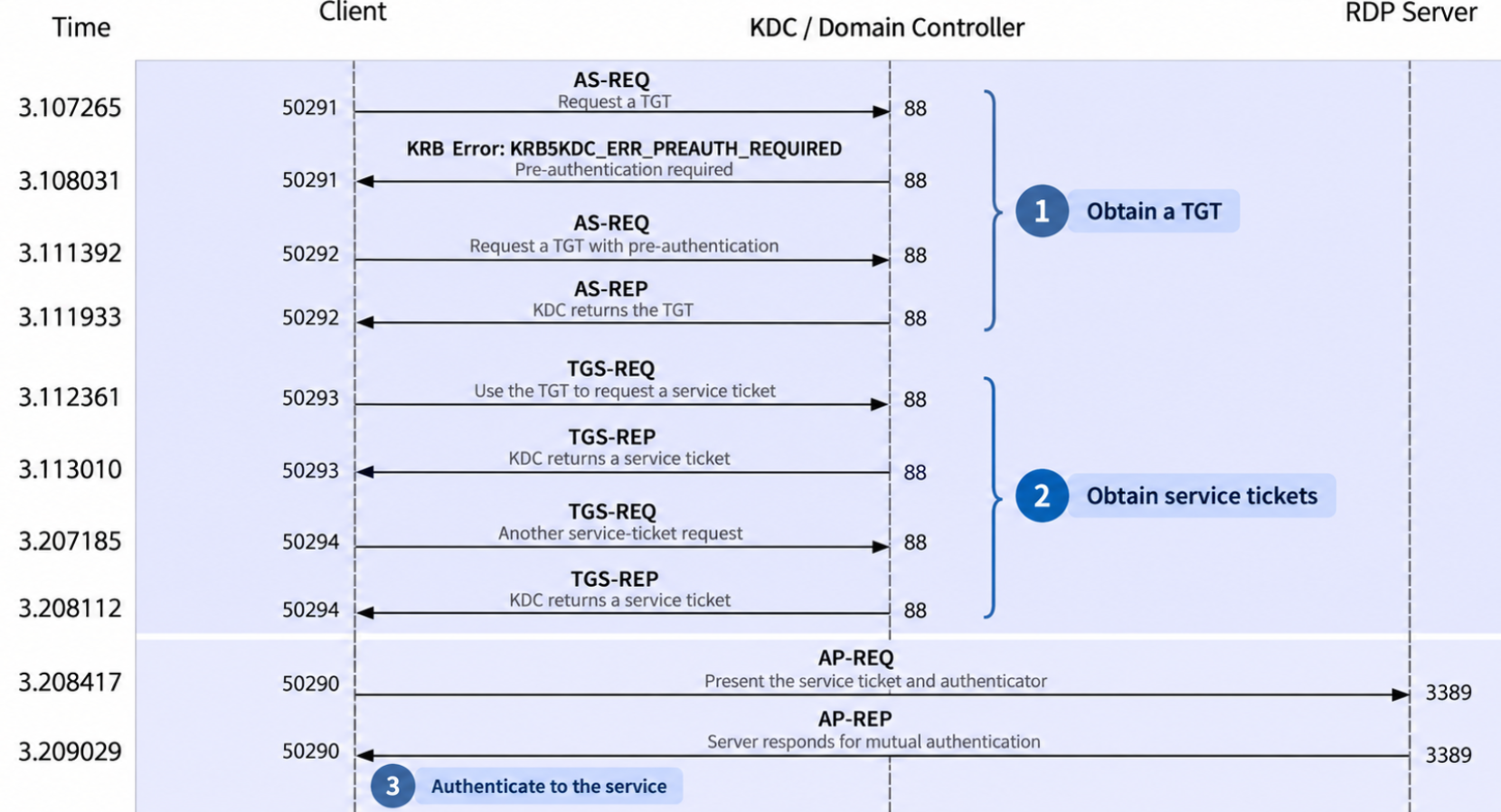
The initial KRB5KDC_ERR_PREAUTH_REQUIRED response is part of the negotiation shown here. The KDC requests pre-authentication data, and the client sends another AS-REQ before receiving its TGT. That error label alone does not indicate an attack or an incorrect password. This label simply means: “I need proof that you are really this user before I give you a Kerberos ticket.”
There is another useful detail in the packet view: the TGS-REQ already contains a ticket:
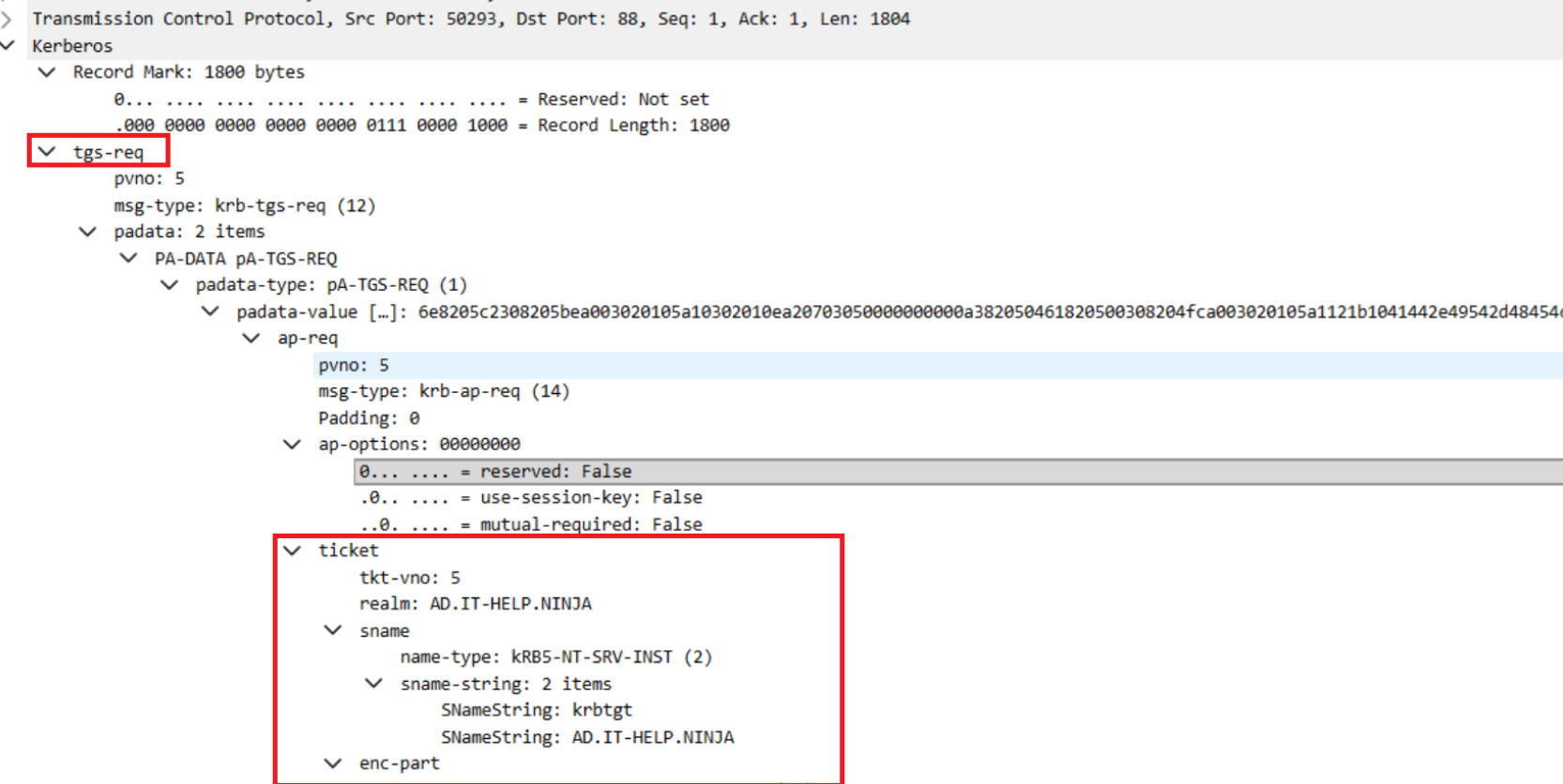
The service name krbtgt/AD.IT-HELP.NINJA identifies that ticket as a TGT for the realm’s ticket-granting service (TGS). It supports the request being made to the KDC. The requested RDP service ticket arrives separately in the TGS-REP.
What a valid ticket could, or couldn’t tell us
A valid ticket supports authentication, but the destination still controls access (authentication versus authorization).
In our example, Windows must determine whether the authenticated account is allowed to establish a Remote Desktop session. Relevant group memberships and logon rights remain part of that decision.
For me, this means separating three observations: a ticket was issued, authentication was attempted, and access was granted. Evidence of one does not automatically establish the other.
When investigating this RDP activity (in case it were malicious), I would therefore look beyond the ticket exchange. I would look at which account was involved, which system initiated the connection, whether the destination recorded a successful remote session, and whether the surrounding activity made sense.